I suppose, given that we got a free day this year (Feb 29th), it might be considered a year since I last posted, but as it's not the 9th until tomorrow, I'm saying it's not quite. ;)
Anyway, yes, I've not been posting. As usually happens, work has been getting in the way (not that I'm complaining, I've shot some beautiful people over the last year and produced a good number of images I'm rather proud of).
I've been teaching some workshops too, and have also recently relaunched an old site under the new guise of learning photography, so I will generally be posting there from now on. I'll also be rewording and updating some of the stuff on here and shifting it over there in the form of new posts.
So, head on over to http://www.johnaldred.com/ and start following there instead. :)
Thursday, 8 March 2012


Wednesday, 9 March 2011
DPI vs. PPI - And why it matters, or not. :)
This post now resides on my new blog, linked below.
http://www.johnaldred.com/dpi-vs-ppi-and-why-it-matters-or-not/
http://www.johnaldred.com/dpi-vs-ppi-and-why-it-matters-or-not/
Monday, 21 June 2010
Goodbye iPhone OS3, Hello iOS4!
 So the day has finally arrived that my iPhone 3GS can look a little sexier for a few days before the iPhone 4 gets released.
The iOS4 update hit about 90 minutes ago, so obviously I was cool, calm and collected it and downloaded it immediately. :)
After a little initial bandwidth problem (it was stuck on "2 hours remaining" for about half an hour), I closed iTunes, restarted the download, and it took about 90 seconds. Another five minutes to backup iPhone OS3, install and verify iOS4 and I'm now up and running.
Now for a pair of quick comparison screenshots : iPhone OS3 on the left, iOS4 on the right.


Obviously I don't have Apple's new Retina Display with the 3GS, but I am noticing that things seem to be displaying a little clearer than they did, perhaps due to new software to recalculate how resizing and font smoothing is done on the fly?
Not had much of a play so far, but the new "Folders" for organising the icons on your desktop into groups is looking rather nice. :)
Wednesday, 9 June 2010
D300s Replacement/Firmware wishes
 After having read Philip Bloom's article Which Video DSLR to Buy, I've been having a bit more of a think about the video aspect of my D300s.
Please note that this article is based solely on the video capabilities (or lack thereof) of the D300s and while some of the features might be useful for stills photography too, that's not my focus here.
I've used the D300s alongside Sony EX1 and Z7 cameras for a few different projects now, and I've started to get a wishlist together of features it doesn't have that I personally feel are pretty essential. Some (all?) of these could probably be implemented as simple Firmware updates, and perhaps one day Nikon will wake up and implement them, but some may require hardware updates in order to be able to maintain processing speed.
The first one for me is a biggy. If no other feature were ever implemented, PLEASE Nikon, I beg of you, give us a live histogram on the liveview display. If this were added, I could continue to deal with the fact that the D300s has no manual control other than the aperture. At least with a live histogram I can zoom in on my Lastolite XpoBalance, let the camera meter, dial in some exposure compensation if necessary, then lock my exposure and know it's about right - I'd be a happy bunny, I'd be able to check via the histogram that my exposures are fairly consistent from shot to shot under different lighting conditions. Without this feature, it's pretty much hit and miss, and I'm only taking the camera's word for it that it's metered my 18% grey consistently from one situation to the next (and if I exceed the limits of the auto-ISO in video mode, then I know it's going to be underexposed - even if I can't actually tell that until I get the footage back onto the computer).
Leading on slightly from this, given that I'm currently having to use the 18% grey section of the XpoBalance to get the D300s to produce a (relatively) consistent exposure between shots, please let me spot meter in video mode. Being stuck in matrix metering mode means that I have to take my camera off the tripod, zoom in completely to my grey card so that it fills the screen, lock the exposure, and then move my camera back to its original position. Not a huge pain in the arse, but a pain none the less. Being able to spot meter an 18% grey card that's only taking up about 1/8th of my shot would be lovely, thank you.
Then there are the obvious ones. Only 24p? Come on now, not all of us live in the film world. Having to transcode 24p into 25p to burn out to DVDs is a step in my workflow that I'd rather not have to be honest with you. It never turns out as well as it would have if I simply had the option to record 25p in the first place, and trying to composite 24p footage with 25p motion graphics in a 25p composition in AfterEffects is just a nightmare. Please give us other framerates. 25p would be awesome and, to be fair to the Americans, let them have 29.976 too (my wife is American, so it'd be great if I could record 29.976 footage, and not have to run 24p footage through Twixtor or something to be able to mail her family a DVD). 50p and 60p are other obvious framerates that many of Nikon's competitors at similar and lower price points can already achieve,
720p. Ok, for some this one is massive. For me, it's not such a big deal (although it may become one by the time the D300s & D3s are replaced in Nikon's lineup). The vast majority of my projects for clients still end up on a PAL format progressive mode DVD, which are standard def. As such, shooting and editing in 720p and then scaling the final project down to 720x576 with a 1.42 pixel aspect ratio is not a huge issue. But, the future is just around the corner. Blu-Ray is actually getting affordable to the general population, even Youtube now supports 1080p high definition video file uploads, and monitors that are capable of 1920x1080 resolution are becoming increasingly more available in the local computer stores. It also means that even if I am still ending up with a DVD project, scaling down from 1080p instead of 720p will still provide a better end result.
Finally, please give us full manual control. Canon have several bodies at a similar or lesser price point than the D300s that offer full control over the aperture, shutter speed and ISO. Why can the D300s not do the same? Why has this not already been fixed in a firmware update?
Edit : Maybe not "finally". I know there was something else, but off the top of my head I don't recall quite what it was. :)
I know that the D3s does overcome some of these inadequacies in the D300s (live histogram and full manual control, for example), but I shouldn't have to go out and spend almost three times the price to be able to get these two minor, but essential, features, especially when the D3s still only records 720p.
At the moment, I'm debating my video future.
Do I continue to struggle with the D300s as merely a support camera for the EX1 with which I normally shoot?
Should I forget shooting on a DSLR entirely for now and just get the Letus Ultimate 35mm adapter so I can put my Nikon glass on the EX1?
Should I hold out and see what Nikon have to offer in the inevitable D400/D4 bodies?
Or do I just pick up a 5DMk2 & Nikon lens to EOS mount adapter and be done with it?
I'm thinking I'll just wait until the D400/D4 are released and see what they offer, but if Nikon can give me a D400 with 1080p, 24/25/30fps, full manual control and a live histogram, I'll take 2 please - if not, I'll probably be in the market for a couple of second hand 5DMk2 bodies and lens adapters.
Saturday, 5 June 2010
Online video streaming via iPhone?
After watching a few live streams over the past few weeks from Chase Jarvis, Philip Bloom and Chris Jones, I decided to do a little bit of research into what's currently available for online video streaming on the cheap.
In the past, several years ago, I'd used Microsoft's Windows Media Encoder, which was great for the intended uses at the time, as I knew all the end users watching the stream were running Windows. I could send out desktop captures, webcam feeds, live input from capture cards, or even saved pre-recorded videos that were already on my PC, and I could switch between them at will with a playlist.
Now, my intentions have changed, as have the capabilities of the audience. As well as the various non-Windows desktop operating systems out there (MacOS, Linux, etc), there are also mobile devices such as the iPhone, iPad, Android, etc., so sending out as a Windows Media stream is no longer really a viable option and nor is a Flash-only option if I want to keep iPhone and iPad visitors happy.
My initial goal was simply to find somewhere that I could stream live and recorded video at little-to-no cost that would be viewable on the iPhone. I hadn't really considered recording videos or streaming out from the iPhone, but it turns out I can do that to (hence this little blog post).
I've been taking a very close look at Ustream (as well as TwitCasting, but we'll get on to that later). Ustream has three different applications available via the iTunes store that can be used on the iPhone, iPod Touch and iPad in order to be able to utilise various features of the site.
The Ustream Viewer should (I'm assuming) work on any version of the iPhone, iPod Touch or iPad (if you know different, please post in the comments). It essentially allows you to view any live or pre-recorded feed full screen on your device, as well as search.
The Ustream Recorder lets you use your iPhone's camera (3GS only according to the info) in order to record video to your phone. Nothing new here, you can do that with the 3GS anyway, but it also allows you to review and manage your local and remote (on Ustream) videos, set tags and schedule uploads.
It will also allow you to import and upload videos previously recorded using the iPhone 3GS's default video recording application. You are also given the ability to upload to Youtube or Facebook and automatically post a tweet when the upload is complete.
Finally we get to the Ustream Live Broadcaster. Firing this up immediately presents you with a box asking whether you want to run in "Local" or "Live" mode.
Running in Local mode is not that much different to using the Ustream Recorder, except slightly more limited. Using the Recorder, you can touch the screen in order to select your focus & exposure point as you can when shooting stills normally with the iPhone; Using Live Broadcaster, you can't.
Running in Live mode, however, is very nice. It automatically (depending on your options) logs you into UStream, selects the channel, turns on your camera and gives you buttons to manage your remove and local videos, change your options, or start broadcasting.
Once broadcasting, you can start or stop a poll on the fly, mute or unmute your audio, send out a post to twitter (presumably announcing your feed), or stop the recording. A little status section at the top tells you for how long you've been broadcasting, and how many viewers are currently watching your feed.
It takes a minute for your feed to properly kick into action once you've got it started up, but once it's up and running, it happily chugs away with about 15 seconds of lag (my iPhone is connected to the net via WiFi, experiences and speeds will obviously vary depending on your iPhone's connection).
Upon completion of your stream, you are asked if you wish to save and announce the stream to Ustream, Facebook, Youtube and/or Twitter.
That's pretty much it. I don't plan on doing a whole lot of streaming from my iPhone out to the rest of the world, perhaps a few minutes here and there, but it's nice to know the ability's there if I ever need it. Now just to see how well it all works from the PC.
I also mentioned TwitCasting earlier. This is quite a neat little streaming app, which embeds your twitter feed below the video you're sending out. Not quite as useful as the Ustream applications, but something cool to play with if you just want to make some quick little video segments to post on Twitter. It will also allow you to save and store your recordings, although it won't allow you to stream/upload previously recorded videos.
Edit : I will be popping images up for this article within the next few days.
In the past, several years ago, I'd used Microsoft's Windows Media Encoder, which was great for the intended uses at the time, as I knew all the end users watching the stream were running Windows. I could send out desktop captures, webcam feeds, live input from capture cards, or even saved pre-recorded videos that were already on my PC, and I could switch between them at will with a playlist.
Now, my intentions have changed, as have the capabilities of the audience. As well as the various non-Windows desktop operating systems out there (MacOS, Linux, etc), there are also mobile devices such as the iPhone, iPad, Android, etc., so sending out as a Windows Media stream is no longer really a viable option and nor is a Flash-only option if I want to keep iPhone and iPad visitors happy.
My initial goal was simply to find somewhere that I could stream live and recorded video at little-to-no cost that would be viewable on the iPhone. I hadn't really considered recording videos or streaming out from the iPhone, but it turns out I can do that to (hence this little blog post).
I've been taking a very close look at Ustream (as well as TwitCasting, but we'll get on to that later). Ustream has three different applications available via the iTunes store that can be used on the iPhone, iPod Touch and iPad in order to be able to utilise various features of the site.
The Ustream Viewer should (I'm assuming) work on any version of the iPhone, iPod Touch or iPad (if you know different, please post in the comments). It essentially allows you to view any live or pre-recorded feed full screen on your device, as well as search.
The Ustream Recorder lets you use your iPhone's camera (3GS only according to the info) in order to record video to your phone. Nothing new here, you can do that with the 3GS anyway, but it also allows you to review and manage your local and remote (on Ustream) videos, set tags and schedule uploads.
It will also allow you to import and upload videos previously recorded using the iPhone 3GS's default video recording application. You are also given the ability to upload to Youtube or Facebook and automatically post a tweet when the upload is complete.
Finally we get to the Ustream Live Broadcaster. Firing this up immediately presents you with a box asking whether you want to run in "Local" or "Live" mode.
Running in Local mode is not that much different to using the Ustream Recorder, except slightly more limited. Using the Recorder, you can touch the screen in order to select your focus & exposure point as you can when shooting stills normally with the iPhone; Using Live Broadcaster, you can't.
Running in Live mode, however, is very nice. It automatically (depending on your options) logs you into UStream, selects the channel, turns on your camera and gives you buttons to manage your remove and local videos, change your options, or start broadcasting.
Once broadcasting, you can start or stop a poll on the fly, mute or unmute your audio, send out a post to twitter (presumably announcing your feed), or stop the recording. A little status section at the top tells you for how long you've been broadcasting, and how many viewers are currently watching your feed.
It takes a minute for your feed to properly kick into action once you've got it started up, but once it's up and running, it happily chugs away with about 15 seconds of lag (my iPhone is connected to the net via WiFi, experiences and speeds will obviously vary depending on your iPhone's connection).
Upon completion of your stream, you are asked if you wish to save and announce the stream to Ustream, Facebook, Youtube and/or Twitter.
That's pretty much it. I don't plan on doing a whole lot of streaming from my iPhone out to the rest of the world, perhaps a few minutes here and there, but it's nice to know the ability's there if I ever need it. Now just to see how well it all works from the PC.
I also mentioned TwitCasting earlier. This is quite a neat little streaming app, which embeds your twitter feed below the video you're sending out. Not quite as useful as the Ustream applications, but something cool to play with if you just want to make some quick little video segments to post on Twitter. It will also allow you to save and store your recordings, although it won't allow you to stream/upload previously recorded videos.
Edit : I will be popping images up for this article within the next few days.
Tuesday, 1 June 2010
Updated : What's in the bag?
In my previous "What's in the bag?" post, I listed the equipment that I would usually take out with me when going off to shoot. Since then, things have changed a little bit; I've picked up a few more bits and pieces and I now have far more equipment than I can easily carry on the train I often use to get to various locations throughout the country.
So, my bag packing styles have changed (and I now have four bags from which to choose the most suitable for a given job). Which bag(s) I use, and what goes into them now varies from job to job, and I will be showing you some of that equipment over the coming weeks, along with some information on why I chose particular items.
If I can't justify why something should be in my bags, I shouldn't be taking it with me!
First off I will be starting with my new camera backpack, the Lowepro Slingshot 300 AW; A much smaller, lighter and more convenient solution than the Cyberpack 6 for those less demanding tasks, such as shooting recon pics and mockups with a friend or assistant while scouting locations. Handy for the occasional day out at the zoo with my wife too. :)
It may be a small bag, but it can still fit two bodies (with grips), 3 or 4 lenses, an SB-900 flash and a couple of extra bits and pieces. So, stay tuned.
So, my bag packing styles have changed (and I now have four bags from which to choose the most suitable for a given job). Which bag(s) I use, and what goes into them now varies from job to job, and I will be showing you some of that equipment over the coming weeks, along with some information on why I chose particular items.
If I can't justify why something should be in my bags, I shouldn't be taking it with me!
First off I will be starting with my new camera backpack, the Lowepro Slingshot 300 AW; A much smaller, lighter and more convenient solution than the Cyberpack 6 for those less demanding tasks, such as shooting recon pics and mockups with a friend or assistant while scouting locations. Handy for the occasional day out at the zoo with my wife too. :)
It may be a small bag, but it can still fit two bodies (with grips), 3 or 4 lenses, an SB-900 flash and a couple of extra bits and pieces. So, stay tuned.
Friday, 28 May 2010
Blogging vs. Real-Life Part 2
I seem to be failing miserably at all this blogging business these days, but it has unfortunately had to take a back seat to the real world for a little bit longer than I had planned.
For those that were curious, shooting with Dirk Benedict at the Who Store went great, and he's a thoroughly nice chap (when he's not reading reviews of the new "A-Team" movie, or somebody reminds him of the fact that Starbuck's female in the new "Battlestar Galactica"). I must remember to bring along a bottle of Glenmorangie if I ever have the opportunity to meet him again.
I should be back again there next month to shoot the 7'1" monster (and I say that in the nicest possible way) that is Ian Whyte. For those of you who don't know, Ian was the predator (hence the "monster" reference) in the two Alien vs. Predator movies and, oddly enough, a double for Madame Olympe Maxime in "Harry Potter and the Goblet of Fire". Currently featuring in the new remake of the film "Clash of the Titans" as Shiek Sulieman.
I'm not going to end this post as I did my last one, seeing that I charged all my batteries last night for this weekend's frivolity at the Yorkshire Game Fair, but I will certainly make an effort to try to keep things a bit more updated when I get back.
I've had a lot of ideas for posts and articles that I really want to get on here; Not only to help you lot out, but also so that 6 months down the line I can remember it myself. :)
For those that were curious, shooting with Dirk Benedict at the Who Store went great, and he's a thoroughly nice chap (when he's not reading reviews of the new "A-Team" movie, or somebody reminds him of the fact that Starbuck's female in the new "Battlestar Galactica"). I must remember to bring along a bottle of Glenmorangie if I ever have the opportunity to meet him again.
I should be back again there next month to shoot the 7'1" monster (and I say that in the nicest possible way) that is Ian Whyte. For those of you who don't know, Ian was the predator (hence the "monster" reference) in the two Alien vs. Predator movies and, oddly enough, a double for Madame Olympe Maxime in "Harry Potter and the Goblet of Fire". Currently featuring in the new remake of the film "Clash of the Titans" as Shiek Sulieman.
I'm not going to end this post as I did my last one, seeing that I charged all my batteries last night for this weekend's frivolity at the Yorkshire Game Fair, but I will certainly make an effort to try to keep things a bit more updated when I get back.
I've had a lot of ideas for posts and articles that I really want to get on here; Not only to help you lot out, but also so that 6 months down the line I can remember it myself. :)
Friday, 7 May 2010
Real-Life always seems to get in the way
I really must apologise for my absence of late. I started off this blog with all good intentions of posting regularly, at least a couple of times a week, but that pesky "real life" stuff always seems to change the order of my priorities when I least expect it.
Last week or so I've spent down in Suffolk working with some great people (Steve Cheshire, MrsC, MegaanC, JaneB and Paul Minus). The whole week was fantastic with some incredible locations to shoot. Hopefully I'll have enough time to get those ones processed relatively soon and post some up for you (Yes, I know, I still need to get the Manchester and Liverpool group shoot images up. This week, I promise!).
Tomorrow is a day I'm very much looking forward to. I get to shoot one of my childhood heroes; Dirk Benedict. Yes, that's right, Templeton "Faceman" Peck, Liuetenant Starbuck, and now starring as the scruffy, bumbling Lieutenant Columbo in the stage production "Columbo: Prescription Murder" currently touring its way across the UK.
Speaking of scruffy, bumbling types; I don't talk politics in public, but I just watched Boris Johnson's interview on BBC News 24. This guy really needs to get a stand up comedy act together. :)
Anyway, I need to switch out the next set of batteries into the charger for tomorrow's shoot, and I probably should start going through last week's images and begin the elimination process.
Last week or so I've spent down in Suffolk working with some great people (Steve Cheshire, MrsC, MegaanC, JaneB and Paul Minus). The whole week was fantastic with some incredible locations to shoot. Hopefully I'll have enough time to get those ones processed relatively soon and post some up for you (Yes, I know, I still need to get the Manchester and Liverpool group shoot images up. This week, I promise!).
Tomorrow is a day I'm very much looking forward to. I get to shoot one of my childhood heroes; Dirk Benedict. Yes, that's right, Templeton "Faceman" Peck, Liuetenant Starbuck, and now starring as the scruffy, bumbling Lieutenant Columbo in the stage production "Columbo: Prescription Murder" currently touring its way across the UK.
Speaking of scruffy, bumbling types; I don't talk politics in public, but I just watched Boris Johnson's interview on BBC News 24. This guy really needs to get a stand up comedy act together. :)
Anyway, I need to switch out the next set of batteries into the charger for tomorrow's shoot, and I probably should start going through last week's images and begin the elimination process.
Friday, 23 April 2010
Follow Friday (23/4/10)
 I've decided to do something a little differently for Twitter's Follow Friday (#ff) from now on. I lose track of the people I've tweeted before, and what everybody I'm following does.
So, from now on, each week, as I see interesting tweets from people and groups I'm following, I'll be updating a draft post on my blod. This post will be published each Friday, listing the most interesting people & tweets I saw that week, then I will post a link to that blog post on my Twitter feed.
- PetaPixel - Now, these guys post a lot of cool stuff, but this was a neat one. Stabilising your camera with some PVC Pipe (wonder how much it might help with hand-held camera shake from HD-DSLRs).
- Nino Leitner - An award winning film maker from Vienna, Austria had a rather interesting blog post this week regarding HD-DSLRs, where they're being used, and some of the technicalities of it all.
- Chase Jarvis - Now, everybody knows Chase, but he posted something extremely cool this week. How to use your iPhone as a wireless camera for your iPad! Now those Fanboys who have both need no longer complain about the iPad's lack of a camera.
- Sunny Lau - Director, designer and photographer. Sunny ran across this amusing video on Youtube this week regarding Steve Jobs' response to the iPhone 4 "leak" on Gizmodo.
- Ace - A good friend of mine, a photographer from down south (although we won't hold that against him!)
- Christiancable - A fellow photographer from the Lancaster Photographic Society
- Mary J Lockwood - A storyteller/writer/comedienne from Lancaster, although now residing in London.
Except for this, as it's not on Twitter, but definitely worth a good read!
- Carl Spring - If you're good at something, never do it for free! (even if you're an amateur!)
Saturday, 17 April 2010
Blackpool Zoo with Talk Photography
 So, button-moon (AKA Tracey) over at Talk Photography decided to organise a meet up at Blackpool Zoo last weekend. The wife and I decided to go along (she'll go to the zoo at the drop of a hat) and take a few pics of the critters darted about their various homes within.
There was about 30 of us that met up, and it was a great day. The weather was fantastic, and the other folks from the forum were a great bunch of people.
I hadn't had a chance to go through all of my pics from the day yet, although I did shoot quite a few, pretty much all of them with the D300s and the 70-200mm f/2.8VR, although I did break out the Sigma 10-20mm for a few of the ring tailed lemurs and the pelicans. I even got told I was cheating when I pulled out an SB-900 in the reptile house (it was worth it though after seeing the results). :)
So, here's a few of my images from the day...


As I gradually get time to go through them, I'll be getting more online, and you'll be able to keep updated on the Blackpool Zoo set on my Flickr pool.
Friday, 9 April 2010
The Voigt has Länded
 Ok, so the title is an absolutely terrible pun, but I wanted to let you guys know that my 1932 Voigtländer Brilliant arrived yesterday. I haven't had much time to play with it yet, but after building a basic contraption, I did get a quick shot last night.
So here is my first TTV picture. Nothing fancy at all. It's my D200 (complete with Jaffa Cakes in the background), shot with my D300s via the Voigtländer Brilliant.

Now, I did cheat a little bit with the lighting. We have energy saving light bulbs in our living room, and even going down manually to 2500K, it was still a little bit warm. So, I fired up an SB-900 and bounced it off the ceiling. :)
I thought my Kodak Brownie Reflex had arrived a couple of days ago too, but on opening up the box, I discovered that the seller had accidentally sent me the wrong camera. So I taped it back up, returned it and they're going to refund my return shipping costs and send me out the right one (so nice to see sellers on eBay that will do the right thing and fix a situation quickly).
So, the Brownie Reflex and Duaflex II cameras are still on their way. I'll probably hold off on experimenting further with TTV until all three are safely in my hands, and I can have a good play with all of them, but I'll be sure to keep you guys updated, and inundated with terrible photos, until I figure out what I'm doing. :)
Tuesday, 6 April 2010
Enabling Colour Profiles in Firefox
 Up until recently I've been calibrating my monitors (HP LP2475w) with the Spyder2Express. Now, this is quite an inexpensive unit, and when I first bought it, I didn't really know much about calibration. It doesn't (officially) support multiple monitors, although there are pain-in-the-ass workarounds that can make it happen (although the whole process can take up to an hour to sort it out each time you need to recalibrate). So, I only ever calibrated my main monitor regularly, the one on which I edit my photos and watch video previews while editing, the other screen being resigned to simply displaying palettes and other program info. But it's also the screen on which I browse the web.
Anyway, after going to the Focus on Imaging show last month, and picking up several 100-sheet packs of Ilford Galerie Smooth Pearl and Harman Crystaljet Luster paper I decided it was about time I got a bit more serious about my calibration (and I really wanted something that would allow me to calibrate a multiple monitor system without all the farting around).
So, I went ahead and I bought the X-Rite Eye One Display 2, and how sexy it is. I bought it from a company called Native Digital, on the recommendation of a friend who had used them in the past. When you buy the Display 2 from them, they also throw in two free printer profiles (normally £15 each), so as I'd just got new papers for the printer, it sounded like a great deal to me.
Unit arrives, bit of screwing around to figure out how the software works, and I have two beautifully calibrated virtually identical screens sitting on my desk. I save an image out of Photoshop, using the sRGB colour profile via "Save for Web and Devices", upload it to Flickr and... hold on a minute... why does it look different to the image in Photoshop?
So I did a little digging, because I could've sworn I read that FireFox 3 supported embedded colour profiles within images. Turns out, it does, although it's not enabled by default, which means that everything is being shown with your standard calibration, and not necessarily how the photographer intended it to be viewed.
After a little more digging around, I discovered that there are a couple of plugins that claim to enable this feature for you, as there is nothing in FireFox's "Options" dialogue, nor any of the menu options. The plugins didn't seem to do a thing for me, so I deleted them, and I can't really tell you what they were, you'll have to hit up Google if you're curious. Eventually I did manage to find a solution (which is a lot less hassle than downloading and installing a plugin to be honest with you), which I'm going to pass along right here.
WARNING : You can seriously screw up your FireFox configuration if you change something in here you're not supposed to change, so I take no responsibility for anything YOU do with YOUR computer. :)
That said, this is what I did, what worked for me, so here it is.
When facing the Firefox browser window, you want to enter "about:config" into the URL bar. You will be then confronted with a warning as shown in the image below (remember, I told you, not my fault if you screw something up. If you're not sure what you're doing, don't do this!).

Clicking the button to continue into the configuration presents you with hundreds and hundreds of ways to screw up your settings...

So, let's narrow things down a bit. You'll want to start by entering "gfx" into the "Filter" box shown at the top of the page, and the option we're going to be editing is highlited in the screenshot below.

Simply double click on this line to bring up the dialog box. When the box comes up, enter a value of "1", and click OK.

Now, your list should look lke this. The "Status" till change from "default" to "user set" to show that the default value has been edited by the user. If you do screw something up, this could help you to find those settings you changed and assist you in resetting them.

Now just restart FireFox (although, I'm not even certain this step is required) and you're all set. Your images with embedded sRGB colour profiles (as the vast majority of photos on the web are) will be displaying their correct colours on your beautifully calibrated screen.
Wednesday, 31 March 2010
Could this be considered regressing?
 So, I've been keeping an eye on some of the "Through the Viewfinder" (TTV) groups recently over on Flickr (like this one, and this one), and I thought "that looks neat, I'll have to give it a go sometime".
While hunting around for a suitable camera to use, I've been astonished at the prices some of these old cameras are still fetching over on eBay in the UK, averaging anywhere from £100-200 a piece. Most of the American TTVers I've seen rave about the excellence of the Argus 75 (aka Argoflex 75) for this use, which seem to sell for a mere £10-20, although with about a £60 shipping cost to the UK as they only seem to be for sale in the US.
Still a little more than I want to pay for an experiment and a little bit of fun. Whilst browsing the auctions last night I ran across a Kodak Brownie Reflex like in the image at the top of this post (which isn't mine, it belongs to Purple Monkey Dish Washer and is used here in accordance with the CC license - he's got a few cracking shots if you dig through his photostream, you should head on over and take a look. Thank you Roy!) for only a tenner; just under £13 with shipping included, bargain!
Anyway, the example I bought isn't quite as pristine as Roy's on the exterior, although it should suit my needs just fine. I will have to build a "contraption" (yes, that's the technical term) in order to be able to shoot from my D300s through the Brownie's viewfinder, but I have an idea of how I'm going to be putting it all together (which I'm sure will fail in no time at all).
Once it arrives, I might see if I can get a couple of rolls of film to put through it before I start to wrap it with foamcore and gaffer tape; If I don't get too impatient and just start at it right way that is. :)
Edit : on a completely unrelated topic, this is brilliant. Translated by a DJ at Radio 1, this had me laughing the whole way through (thanks Lenz!)
Edit 2 : Back to the original topic, also just got a Voigtlander Brilliance for an absolute steal, so I'll have a couple of cameras to experiment with now. Also picked up some extension tubes to be able to make a shorter contraption using my Nikon 50mm f/1.8D lens.
Edit 3 : Ok, so I have a Kodak Duaflex II coming as well. I wish Royal Mail would get off their backsides, get back to work and deliver my packages to me. Anybody would think it was a holiday or something. ;)
Sunday, 28 March 2010
Gellin' like Magellan
 I've had a number of people over the past few weeks ask me about gelling speedlight flashes, and how I do it. What gels do I carry around? How do I attach them to my speedlights? Are there any technical issues I need to think about? and so on.
Then today a thread was started on the Strobist Flickr group regarding the storage and organisation of gels and attaching them to the flash, so I was going to fire off a couple of pics. Well, I ended up shooting more than a couple, and decided to finally write a bit of a blog post about it.
I will use the terms "gel" and "filter" interchangeably throughout this post, but please note that when I say "filter", I'm talking about gels for your flashes, not those that you screw onto the end of your lens. :)
 So, to start with, I use Nikon SB-900, SB-600 and Yongnuo YN460-II flashes. The SB-900 comes with its own gel holder, and a small selection of common gels which work well if you happen to need exactly those gels, but sometimes you don't (although there is the Nikon SJ-3 filter kit available for the SB-900 to give you a little more variety).
In the image above, you can see the three models of flashes mentioned, as well as my "gel folder". It's actually a business card holder, but it works perfectly. In the front of the folder is a pouch containing my four Lumiquest FXtra gel holders. Beyond that are pages of gels, ordered in different strengths, grouped according to colour.
On the first page of gels, you can see double CTO at the top, then full CTO, then 1/2 CTO and 1/4 CTO. The slip with information from the Rosco swatchbook is contained in the same pocket, and each gel has an address label attached to the end for quick and easy organisation when packing things away.


Above you can see a selection of CTO, CTB and Neutral Density filters that I pop over the flashes. Why neutral density filters? Well, sometimes, lowest power just isn't low enough, especially if you're working in close quarters with really tiny subjects.
To attach these gels to my flash, as mentioned, I use the Lumiquest FXtra gel holders. They can seem a little pricey, but I believe they are definitely worth it. It makes adding, removing or switching gels an absolute breeze, and using the cinch straps, there's no bits of velcro glued to your flashes and no sticky residue to deal with when they fall off.
Here are the Nikon SB-600, SB-900 and Yongnuo YN460-II flashes with the Lumiquest FXtra gel holders attached. The image on the left shows the coverage over the front of the flash, and the image on the right shows the potential for light leakage on the sides.


As you can see, the FXtra's opening completely covers the flash head of both the SB-600 and the YN460-II when viewed from the front, which makes them idea for flashes with a head this size. It is a little tight on the SB-900, and the gel holder itself doesn't cover the full width of the flash, but not enough that it's ever bothered me. You can see on the image on the right, that the YN460-II gets the closest to the flash head for less leakage potential, although its head is fixed at 35mm, whereas the SB-600 and SB-900 can zoom their head for longer reach and less risk of spill.
Again, light spill out the sides from these has never really bothered me, and I can't really say it's affected my images, however thoes gaps at the side can easily be covered by a bit of black gaffer tape.
A couple of things to note when using it with an SB-900. Firstly, as mentioned, the FXtra doesn't cover the full width of the SB-900 flash head. This, in and of itself, is not a huge problem, as the gels are wide enough to cover the entire head. The other thing is that you've picked your gels out of a swatch book, they will have holes in them. You will need to either cover these up, or source gels that do not contain holes, such as those found in the strobist collection.
 There is another reason I chose to go with the FXtra gel holders, and that is as well as having velcro on the inside for attaching the holder to your flash, it also has velcro on the outside too, meaning you can attach further light modifiers. This makes it very handy if you need to use a flash on-camera with a gel, but still wish to use something like a Lumiquest 80/20 bouncer, a snoot, or a small honeycomb grid.
This light modifier allows 80% of your flash's output to continue straight on to bounce of a ceiling or a wall or whatever, while 20% of the light hits the bouncer and is directed at your subject in a slightly diffused manner. This essentially allows your flash to be its own key and fill light, although with varying degrees of success depending on your surroundings. It's not really all that cheap considering what it is, but it's something I wouldn't be without in my bag for those times when it's really needed.
So, that's a little more on the how, and what I use to attach flashes to my speedlights, and a bit of why I chose to go the particular route I went - essentially speed of use and the ability to add extra modifiers over the top of the FXtra.
I'll post a little more about why you would actually need to use gels (and why you might want to even when you don't need to) at some point in the future.
Thursday, 25 March 2010
First Front Cover
 I actually noticed this a couple of weeks ago, but I recently found out I got my first front cover published! (I've just been far too busy the last couple of weeks and it kept slipping my mind to tell you guys about it).
This image was shot at the Second International Festival of Falconry, which was held at Englefield Estate, in Reading on July 11th & 12th, 2009. Now, the British Falconers' Club newsletter is only released bi-anually, so it took a while for it to go to press after the event, but I was quite surprised to see one of the images I'd submitted adorning the front cover.

Just in case you don't recognise him, the chap in the middle is His Royal Highness Prince Andrew being presented with a white gyr falcon (Falco rusticolus) by His Highness Sheikh Sultan Bin Tahnoon Al Nahyan of Abu Dhabi.
So, as you can probably guess, I was pretty chuffed when I saw that, and still am. :)
Monday, 22 March 2010
A couple of videos today
I've been quite slack in posting this month due to getting out a bit more and actually doing some shoots, then the inevitable post-processing that comes afterwards, so I do apologise for neglecting you all. I do, however, have all the models' choices processed from the Manchester shoot now, so I'll hopefully have enough time free to get those posted in the next couple of days.
I did make a little video the other day though demonstrating the use of a Nikon SB-600 as a repeating flash slave using the Nikon CLS system with a hotshoed SB-900 as the commander - somebody posted on a forum that this couldn't be done, so I had to prove them otherwise.
The whole repeating flash thing has me intrigued, so I'll be doing various test with SB-900, SB-600, Yongnuo YN460-II flashes, using the CLS system, standard optical slave modes and wireless triggers to see exactly what will and won't work, and the degree of reliability with each. I'll be doing a few experiments with different ideas and setups, so I'll post details on those as I get through them.
The other video I'm posting isn't one of mine. Zack Arias did a very inspirational and informational talk a few days ago at PhotoCamp Utah 2010, with a lot of GREAT tips and advice.
There are also plenty of other videos from the event on their Ustream channel, so head on over and have a watch.
I did make a little video the other day though demonstrating the use of a Nikon SB-600 as a repeating flash slave using the Nikon CLS system with a hotshoed SB-900 as the commander - somebody posted on a forum that this couldn't be done, so I had to prove them otherwise.
The whole repeating flash thing has me intrigued, so I'll be doing various test with SB-900, SB-600, Yongnuo YN460-II flashes, using the CLS system, standard optical slave modes and wireless triggers to see exactly what will and won't work, and the degree of reliability with each. I'll be doing a few experiments with different ideas and setups, so I'll post details on those as I get through them.
The other video I'm posting isn't one of mine. Zack Arias did a very inspirational and informational talk a few days ago at PhotoCamp Utah 2010, with a lot of GREAT tips and advice.
There are also plenty of other videos from the event on their Ustream channel, so head on over and have a watch.
Monday, 15 March 2010
Liverpool Group Shoot
 So, I made it through another group shoot, this time at VIP Studios in Liverpool. Another excellent day, and loads of fun with some very cool people. We all spent the day rushed off our feet, and everybody had such a great (and tiring) day.
It's not often I shoot in a studio (well, not for stills anyway), so I spent a bit of time playing around with beauty dishes, smoke machine and other gear I don't normally use. Didn't get quite as much time playing with them as I would've liked (well, it was a group shoot, and everybody had to have a go), but it was still a very enjoyable time.
I know I've still not posted up any new pics from the Manchester shoot, but the models are still getting back to me on which they'd like me to edit for their portfolios. Once they've all chosen, I'll post the finished works on here (although some are already up on my Flickr).
The only image I've really worked on from the Liverpool shoot so far is the one at the top right of this post. As soon as I saw the frame I had to give this a go, and Marie was such a star reproducing several poses with and without clothes to try to get matching images. It probably would've been more effective with a smaller frame, so next time we get the chance to shoot together again, we're going to be trying with a smaller frame, perhaps even several frames to make things a little more tricky. :)
A big thank you to Sabrina Atkinson, our MUA/Stylist for the day, she did a fabulous job, and didn't stop all day. Also a big thank you to Marie, Raj, Ophelia, Kit and Keely, our models, you were all great, and thank you to all the other photographers for showing up and making it a great day for all.
Thursday, 11 March 2010
Focus on Imaging 2010
 I have to apologise for my absence of late, since the Manchester shoot things have been busy busy, with very little time spare to keep you guys updated. But I wanted to post a bit of an update on here regarding the last few days.
Late last night I got home from spending a couple of days at the Focus on Imaging show at the Birmingham NEC, as I'm sure a few of you reading this also did. While nowhere near as big as Focus has been in previous years, I had a great time at the show. I got to meet up with a good few people I've chatted with online for months but hadn't actually met before from a couple of sites I visit and got to catch up with some others I haven't seen for a while (Hi AnnMarie, Roze, Steve, Ace, Daniel, Marcus, Lenz, Karen, Monmodel, Mr Nutley, Matt, Kevin - apologies to those I missed off the list). It was a great pleasure hanging out with you guys on Tuesday, and getting to meet some of you for the first time.
Tuesday was pretty much a social day, and I had great fun. I didn't get to see much of the show though, that came on Wednesday.
Surprisingly, I didn't max out all my credit cards at the show, although the opportunity was definitely there and ended up coming home with a couple of packs of Ilford Galerie Smooth Pearl, a couple of packs of Harman Crystaljet Luster, a Strobies XS bracket (couldn't find a beauty dish though), and some Lumiquest bits.
Even more surprisingly, my first port of call on Wednesday was to see the folks at Canon. I have to stress though, we're talking printers here, not cameras. After getting an introduction to the Canon large format printers at the Spring Fair International last month, Peter and I went to go over and have a chat and look at the full range of large format printers they had on display at Focus - and by Wednesday, the deals available for those with cash were pretty outstanding, but due to lack of space I've decided to hold off for now (it's not so easy to find a home for a printer that's 6ft wide).
The next stop was the Ilford stand (the real one). I didn't actually realise until yesterday that Ilford and Ilford Galerie are two different companies. The original Ilford went bust several years ago, and it was bought out by a small group of people who are continuing to produce their black and white film papers under the Ilford name, and boy are they beautiful. They do, however produce a range of inkjet papers under the brand name Harman. The company that produces the Ilford Galerie inkjet paper is based in Japan and the paper is produced by them under license.
After looking at the samples available, the Harman Crystaljet Luster just jumped right out at me as being a very very nice looking paper, and at a mere £13 per pack of 100 sheets, I had to grab a couple of packs to give it a good workout. I did also head over to 1st Camera and pick up a couple of packs of the Ilford Galerie Smooth Pearl too, as mentioned above, and initial tests show the two as being very very close with regard to quality, colour and contrast. The wife actually prefers the look of prints on the Harman Luster at almost 1/3rd the cost of the Ilford Smooth Pearl.
My next stop was to see the folks at Jacobs Digital to pick up an Interfit Strobies XS bracket. I hadn't realised until I saw it at the show that the Strobies XS bracket came with a 7" dome reflector, which is quite a nice little addition to throw in the box. I am a little concerned that the SB-900 sticks out very far on the front compared to the image on the box, although the gentlemen I spoke to at the Interfit stand assures me the product was designed specifically with the SB-900 in mind and it sticks out at the appropriate distance, however if I need to throw a radio trigger or TTL cord on that flash, it's definitely going to be sticking out too far, so I'll have to have a play, try a bunch of different light modifiers and see what's what before I'm convinced of its usefulness. I might have to pick up a second hand SB-800 to use with this as there is a fairly substantial size difference between the two.
We wandered about a bit going past variou stands, had a play with the Wacom Intuos 4 tablets (very sexy, very expensive, but worth every penny), a quick look at the Cintiq, then passed various software stands (On1, Portrait Professional, etc), before finally making our way over to the main Nikon stand.
I've been wanting to have a play with the D3s for a while and I finally got my chance. I fired off a few test shots with the D3s and Nikon 24-70mm f/2.8 at ISOs ranging from 200-12800, so once I've had a chance to unpack and go through those images, I'll pop up a little mini review. I had my D300s with me, and I have the original Nikon 70-200 f/2.8 VR lens, so I was curious how the new VRII compared. Had a good little play with that one, shooting handheld all the way down to 1/8th of a second. VR isn't something I use all that often on my 70-200 as I'm generally shooting in bright daylight, higher ISO or using flash to freeze moving subjects, but I have to admit, I was impressed.
But, back to the D3s, even more impressed. I'd forgotten how big full frame was compared to DX, as it's been a few years since I ran any film through the N90s, but I think I'll definitely be looking into the possibility at some point in the future, although it's not a high priority.
I did get a chance to look at the Bowens stand and ask them a bunch of questions too. I haven't really used studio strobes all that much, so it was good getting to chat to somebody who could actually explain to me the differences between the various models. Something else that's not on the high priority list, but there were some nice bargains available on the Bowens gear at various retailers. I think that'll be one to pick up next year.
That's it for now. I'm going to get another coffee, and start to unpack. :)
Tuesday, 2 March 2010
Great day at the Victoria Baths in Manchester
 So, Sunday's shoot was great, got to work with some fantastic people (Hi Annmarie, Jade, Jo, Emma, Keighley, Cindy, Sarah, Steve, Jonathan and everybody else I've failed to mention!) during the group shoot organised by TFPModels at the Victoria Baths in Manchester.
Had an absolute blast but was a very very exhausting day, and the temperatures really didn't help, but everybody was so nice and such great fun. The models were all superstars, braving the cold and struggling to get poses in between big iron pipes, holes in walls and other crazy spots.
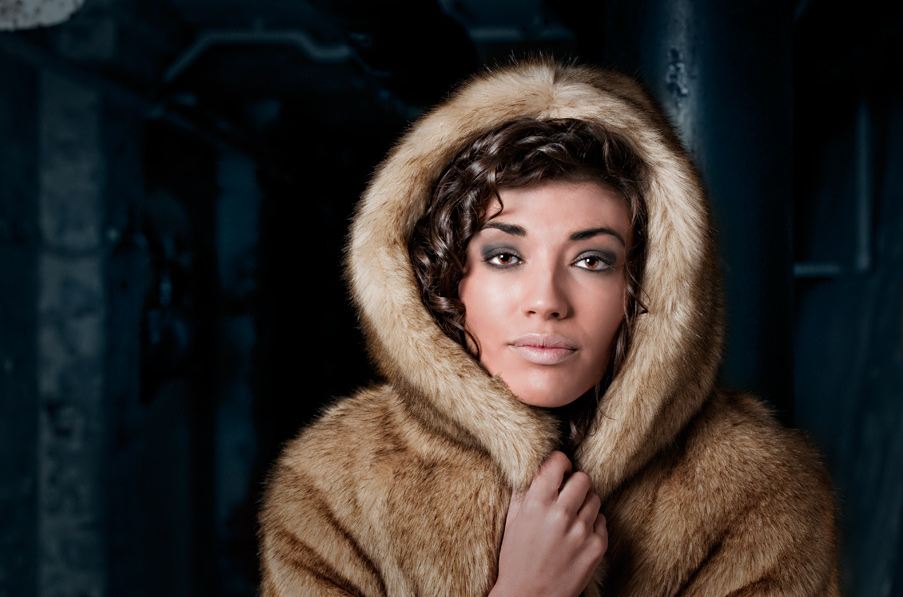
I'll be posting up more of the photos as I make my way through them, but here's a few images of the lovely Cindy to tide you over. It did get awfully cold in those tunnels, and while not officially a part of the outfit, I couldn't resist getting a couple of shots in that big warm coat. :)


Cindy was a pleasure to shoot, and hopefully we'll get the chance to work together again real soon.
Oh, while I've got you here, saw this today, gave me a good chuckle. :)
Friday, 26 February 2010
The Charging Has Begun
So, I've not quite left yet. I'm currently in the process of charging up all my batteries ready for the weekend's shooting; 5x Nikon EN-EL3e, 40x GP2700mAh AA, 12x GP1000mAh AAA. Should keep me busy for a while.
But, I just saw something mentioned over on Twitter that caught my eye. I know we've all seen the tilt shift effect timelapse over on Vimeo and Youtube before, but "The Sandpit" is one I felt was particularly nice and very well executed.
Shot mostly with the Nikon D3 (there are some bits done with a D80), and the tilt-shift effect added in Post, this is one of the best examples of time-lapse tilt-shift effect footage I've seen.
I'm sure the 35,000 images took a lot more effort and willpower to post and put together than he's letting on, but you can read more about the making of it over on Aéro Film's blog.
But, I just saw something mentioned over on Twitter that caught my eye. I know we've all seen the tilt shift effect timelapse over on Vimeo and Youtube before, but "The Sandpit" is one I felt was particularly nice and very well executed.
Shot mostly with the Nikon D3 (there are some bits done with a D80), and the tilt-shift effect added in Post, this is one of the best examples of time-lapse tilt-shift effect footage I've seen.
I'm sure the 35,000 images took a lot more effort and willpower to post and put together than he's letting on, but you can read more about the making of it over on Aéro Film's blog.
Subscribe to:
Posts (Atom)


 Posts
Posts


